Choose Your Language

Monday, 28 February 2011

The Real Life System

After reading this post on Kamal's Blog, I was reminded of the code I have added to my own campaign regarding NPC responses to PC's actions. The following sentence by Kamal, in particular, reminded me very much of my own campaign: "No more trying to pick the lock with the merchant standing right there, at least not without potential consequences." Kamal also mentions a few other systems, from pick-pocketing to mini-game lock-pickings, which all reminded me of additions I have included to my own campaign. Therefore, as I had not yet made a dedicated post about the Real Life System I have in my campaign, I felt it deserved one now.

An Underlying System

As regular readers will know, only last week I decided to put together a manual to help explain some of the background and systems I have used for this campaign. In the process, I have already touched upon and written something about the Real Life System and so will make my life easier by cutting and pasting some of the information straight from the manual:

The “Real Life System” is actually the overall name for a group of systems that work together to provide the player with new mechanics that govern how the environment reacts to the PC’s actions (over and above the normal NWN rules) and especially how NPCs will respond to them. In essence, it is the core idea behind the “artificial intelligent DM”. These are the many mechanic systems with which the player should familiarise themselves to have the best gaming experience with this campaign.

And ...

Another aspect of this campaign (different from most others you will have played) is that the artificial intelligence (AI) is designed to respond to a PC’s actions more intelligently, as if there was a DM present who controlled the actions of nearby NPCs. E.g. If you try to damage or interfere with property that does not belong to your PC (or they do not have permission to touch) then nearby NPCs will stop you from tampering with said object until either:

A) The party are able to prevent their actions being detected.
B) Permission is gained from the object owner to interact with the object.
C) The NPC preventing the action is “removed” from the vicinity.

Subject to how the player handles such situations also plays a big part on how their party alignment develops. (See Alignment Changes.) For more information on the different aspects of the Real Life System, please see the Game Systems section of the manual.


Important to note, the Real Life System is fundamental to the design of the campaign and comprises many systems all with the same goal: to help the game respond to player's actions in an intelligent way as possible. Key elements of the this governing system are the alignment and influence systems, which help determine the PCs interaction with other characters.

There are, of course, many other considerations to take into account when creating a system like this, but I have tried to include them whenever possible; including such things as determining if a PC has taken steps to conceal specific actions, and preventing impossibilities such as invisible PCs from speaking to NPCs without choosing to become visible first. The end result is that the module feels much more responsive and alive to the player's actions. My only concern is that some players may find the result too challenging.

FEEDBACK: If you have any comments regarding this aspect of the game (real life responses), then please give me feedback. Tell me of your own experiences and what you have liked or disliked in other games when it comes to this sort of thing. Is there something you would like included or excluded?

The Campaign Manual

As I mentioned above, I have been concentrating on putting the campaign manual together this week. It is not finished and will probably take me a few more weeks yet. The core design is in place, however, and I include a few of the finished pages (also reflecting some of the above post) as images below.


The Title Page


Some Game Parameters


A Unique World
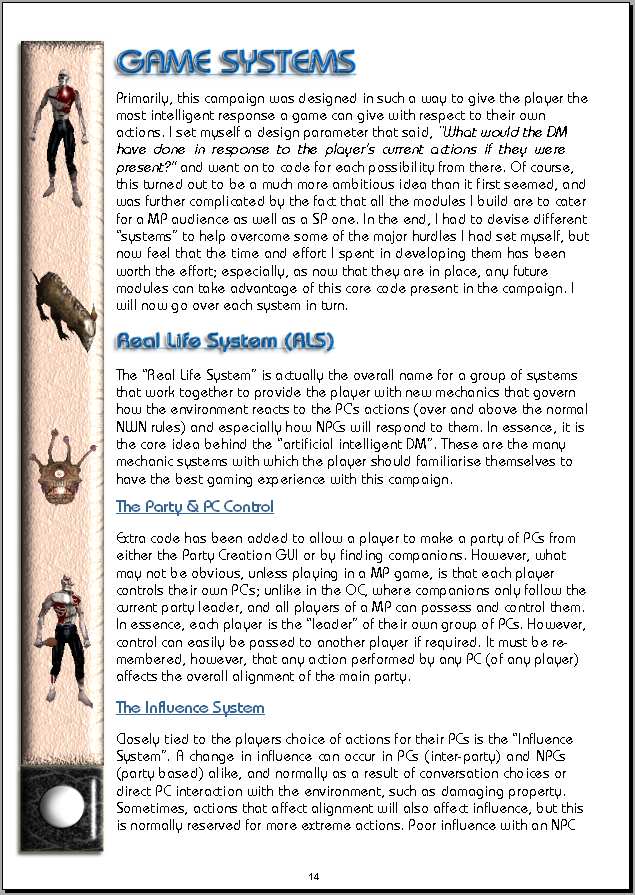

Game Systems Section


Load Material

As writing the manual took most of my time this week, I only managed a little work on the module itself, by preparing the 2da files for the load hints and load screens. I was caught off guard at first, when I discovered it was the nwn2_tips.2da rather than the loadhints.2da that required editing for the load hints, but after I realised this, all was simple enough. Both the 2da files have now been edited, updated and tested as working, but I currently have only one load screen image and a handful of tips edited in the tlk file. It should be a simple enough task to add to these at a later time.

Will You Be Crafting?

We enter the last few days for the latest poll: Will You Be Crafting? If you have not yet voted and wish to do so, then please vote before the time runs out.

Wednesday, 16 February 2011

An Assortment of Updates

There is no one topic for the project to report on for the last couple of weeks, as I have been dipping in and out of various parts of the campaign that need addressing as and when I am inspired. The main reason for this is because I have been trying to give some of my time and energy in supporting people with incorporating my Mapping System into their own modules. And while this did not require a great deal of effort on my part, it did mean using some of the time I had to respond as and when I could. However, I was more than happy to oblige where possible and it gave me a chance to talk (email) others about their own projects. Furthermore, the good news from this is that there are now two modules (that I know of) that are looking at being re-released with the new mapping system incorporated. I have already had the chance to look at one these modules, Risen Hero, and can say that the "fog of war" system that comes with mapping system I devised does indeed add an extra level of intrigue during play. The other module, currently under conversion is Trinity, by E.C. Patterson. Watch out for their re-releases on the Vault.
Campaign Manual

I have also decided to put together a brief manual for the campaign to help prepare players for their gaming experience with Better The Demon. This is because there are enough differences in the normal NWN style of play to warrant some background information for the player. The "serious" gameplay approach that the game presents will be explained as well as other more common playing elements like death and crafting. All such elements have undergone changes and the player will be left somewhat bemused as to what is happening if I do not give them some sort of manual with which to refer. At the moment, however, the manual is nothing more than a few rough notes jotted down in my paper notebook.

Crafting With The Greater Essences

Talking of crafting, I did write a few more pages to the new crafting recipe book that details crafting using the greater essences. I know this book will serve little purpose in the initial module (as it requires the PC to be at least 8th level to use - which is still 4 levels lower than the OC anyway), but I did want the book to be available from module one, so that the player can start to plan their crafting of items ahead of time. I know most readers like to see screenshots, so here are a few of some of the opening pages to, hopefully, whet your appetite: (I am aware of the typo on the 4th page. There may be others that will be addressed in time.)


Thursday, 3 February 2011

Area Map - Fog of War!

How many times have you had your "desire for exploration" frustrated because of being given a whole map of an area even before you started exploring it? What ever happened to the good old "fog of war" (FOW) that represented the parts of an area we weren't familiar with yet? Well, I can at last declare that after giving it more thought, I have finally achieved this for NWN2! For the astute among you (E.g. E.C. Patterson's post on the previous Map Blog), I did indeed manage to rework the "grid" idea that I used with the Rune Puzzle into a "fog" for an area map.

The task was simple enough in the end, but something I had to keep going back to because it required the repetitive task of copying and pasting lines of data, which then needed slight alteration. My concentration only holds for short periods of time and so I had to break the task over a number of days. I am, however, most pleased with the end result. Furthermore, this new system works alongside my previous system for making the "Map Unavailable".

Area Mapping

There are some changes to the way the area map works, simply because the area map function now relates to what the PC knows about the area or has "mapped". Pressing "M" on the keyboard now brings up the map fully zoomed out and giving the maximum view. It is no longer possible to zoom in on an area map, because the map is meant to be a fixed reference that the PC has made for themselves. Note, however, the mini-map (accessed by pressing "N" on the keyboard), still has the + and - zoom buttons to focus in on the immediate area that this map provides. You will also see from the screenshots that the mini-map has been redesigned to give a slightly larger view than it did originally. (It is not subject to FOW.)


The PC starts mapping by opening the area map.


Furthermore, as the area map now represents what the PC is mapping, this map only updates when the player has the map open. If they move around an area with the map closed, then the map is not updated and the FOW is not removed. The map will also automatically close if the PC enters combat. There can be no map referencing while the PC is in combat. Mapping has been made personal to each player. Therefore, in a MP game, players will have maps with differing levels of FOW removed according to where they have explored and mapped. This information remains intact between area changes.


The Fog of War updates as the PC wanders across the area mapping.


An example of where the PC stopped mapping and moved before starting mapping again.


The Map System

The new system was designed to allow the builder to ensure a map is not immediately available to the player. However, there are circumstances when an area is either too small (only one or two rooms), or said to be known well enough by the PC to be provided with the full area details from the start. The system takes this into account, allowing the builder to enable or disable the initial FOW as required.

Current testing has shown the system to be robust and works well for both indoor and outdoor areas and even for custom size areas beyond the standard sizes. It makes only one assumption: that an exterior area has a 4 tile border, which I have not seen differently to date. However, if this is not the case, there is provision for the builder to add a couple of variables to the area in question to correct for this if need be. NB: I have NEVER seen this as a problem to date, and it may not even be possible to build an exterior area without the border in question.

Other News

I have decide that I will be releasing Module 1 prior to finishing modules 2 and 3. This is so I can start receiving feedback and make corrections I may need to make along the way. To this end, I have updated the left side pane to show the percentage completion rates for each module.

For the time being, I have placed the two other puzzles I had in mind on hold, so that I can concentrate on trying to finish the first module. I decided these puzzles and others I have in mind could be integrated at a later date if need be.

Crafting System Poll

Thanks to those who voted on the current poll. It is good to see that the alterations to the OC crafting system I have made are encouraging some to look at crafting in this module more positively. If you have not voted yet, then please do.

Thursday, 27 January 2011

Mini Game Puzzles

Do you enjoy mini-game puzzles? When playing D&D, back in the days when everything was done with a pencil and paper (and almost too far back to remember now) I used to enjoy creating puzzles for my players to try to solve. It was all part of the great gaming experience that made D&D what it was (in my opinion) and while some players might baulk at the idea of finding one, the majority would approach the puzzle with enthusiasm for the challenge. From the poll I took in August last year, it would seem about 55% of players (who read my blog) also enjoy puzzles.

When it comes to designing puzzles in a CRPG, however, a builder is limited to their knowledge of the scripting language, and XML if they want to design new interfaces for puzzle interaction. Furthermore, designing a puzzle to be included in such a way as to not appear orchestrated can be difficult to achieve. This last point, however, is also true for classic D&D. Yet, these obstacles aside, I believe there is room for a little "poetic licence" to allow the builder to be creative with their ideas and include puzzles as a minor distraction to the normal flow of events. If a player can accept the game with this premise in mind, then it can be fun all around.

Not Everyone's Idea of Fun

I do recognise, however, that some players do not like puzzles at all, or find some puzzles a frustration rather than an enjoyable distraction. With this in mind, I have tried to ensure the player does have an alternative means to bypass a puzzle and to move the game forward. Such bypassing does come at a cost (gold or Life Essence), but this should not be seen as being penalised, but as the minimum cost that would have been asked if the puzzle did not exist in the first place. E.g. I posted about my Coded Mechanism Puzzle in an earlier blog. In this puzzle, the player can choose to try to solve the puzzle to move the plot forward at no cost or use Decipher Tools to bypass it instead. If the puzzle had not existed, the same obstacle would have cost the player an amount of gold equalling the cost of the Decipher Tools that were used to bypass this puzzle. In other words, a DM or builder provides a puzzle to allow the player to get something for nothing if they take the time and effort to try to solve it.

A Little More Help?

The other problem with designing puzzles for a CRPG is that there is no immediate contact with a DM to offer hints and clues to solve the puzzle (unless playing with a DM). For the games where no DM is present (SP gaming), I have designed a new feat for the player to take for their PC, called Expert Decoder. This feat is geared towards players who enjoy puzzles, but feel they need just a little more guidance or more time to solve them where a time limit is involved. If this type of player takes the new feat during character build or when levelling, then the extra hints and time come as a reward for their PC learning choice.

The Puzzles

I have already mentioned the Coded Mechanism and have also mentioned my Combination Chest puzzle in an earlier post. There are also a few others that I touched upon, like the Chameleon Puzzle. I will now mention a few others I have been working on, with their differences relating to being bypassed or if the Expert Decoder gives any benefit:

RUNE WARD PUZZLE: Some locks are protected by dwarf rune magik. No normal lock is presented, but a magikal lock that only an agile mind and a good dexterity can overcome. Basically, the player is presented with a grid that represents the locking mechanism and its components. Once activated, the player must match the number of runes required to deactivate the mechanism within a time limit. Some locks are harder to bypass than others, but all allow the PC to sacrifice Life Essence to bypass the lock if need be. Furthermore, a PC with the Expert Decoder feat is allowed a time bonus when trying to deactivate the lock.

Player Starts A Rune Ward Puzzle (This one has four parts to solve.)


Time Ticks Away! (Found one half of a pair, but also drawn a blank!)


One Pair Found! Only Three More To Go! (And only 45 seconds left!)

CYPHER PUZZLE: Sometimes the PC will be up against an intelligent foe. Knowing their plans may be foiled by interfering adventurers, they ensure their communications with their troops are kept encoded so that only those that know the code can translate the message. However, if any of these messages do fall into the hands of the PCs, then they may spend some time looking at the text to see if they can crack the code and understand the message. There is no time limit involved when trying to decipher a text and there is currently no way to bypass this puzzle. However, the PC who has the Expert Decoder feat does get a clue if they are proceeding correctly.

Player starts a Cypher Puzzle (Instructions given.)


This was a test for my wife. (In case you interpret it.)


The yellow letters represent a correct letter if you have the Expert Decoder feat.

RIPPED SCROLL PUZZLE: A page with some useful information has been torn and thrown away. The PCs manage to gather these parts and want to see what was on the page: an important letter, a picture containing a clue, or just an old shopping invoice? This is a simple 25 piece block puzzle. The player is presented with a jumbled image comprised of 25 scrambled parts of an image. As it currently stands, there is no time limit to this puzzle, but neither is there any way to bypass it or gain an advantage with the Expert Decoder feat.

Player Is Presented With The Ripped Scroll Puzzle Instructions.


No Spoiler Text Here - But An Example of A Part Being Swapped

OTHERS (IN PLANNING STAGE)

SINGING GEMS PUZZLE: Maybe an important magikal lock or a simple tavern game, I am yet to decide. Maybe both? The player is presented with a number of gems (4 - 8) that begin to play their strange tuneful chime when the player interacts with them. The gems play a note in turn and the player has to repeat the tune; the number of notes gradually increasing. (Think of the game called "Simon".)

LOCK SPRING PUZZLE: The PCs have come across another magikal lock. This one, however, looks as though it can be overcome by careful examination of the mechanism and some luck. The player is presented with a grid that represents the hidden mechanism. The player then has to start clicking on the different pieces of the lock in an effort to understand its mechanism and work out where each lock part is. (Think of the game called "Minesweeper".)

Means To An End

With all these puzzles, however, I want the player to realise while playing them that they are more than simple games, but a means to overcome an obstacle that will move the plot forward, with the exception of the potential tavern game, which can have its own interesting twist.

Final Word & Request

In every puzzle, I have tried to give extra thought and attention as to how it will work in a MP environment as well as a SP game. For instance, I have decided that while all players may have the Cypher Puzzle open to see, only one player (the one who first discovers the puzzle) can operate the buttons. Note, however, there is nothing to stop this player from leaving the puzzle and allowing another player to act as the main player instead, leaving the first as an observer instead.

I have asked this before, but will ask it again: In the light of the current puzzles explained, do you have any thoughts or suggestions to add? Most of all, is there a puzzle or mini game concept that you would like to see if possible? I have tried to take on board comments in the past, and have greatly appreciated feedback to date. If, however, you believe I have missed an important point, then please let me know.

Of course, any general feedback is very much appreciate as well :)

Tuesday, 18 January 2011

Making The Area Map Unavailable

Have you ever wanted to prevent the player from having access to the maps available? Maybe, as designer, you deem an area would be too complex for the PC to map. Or, maybe, you do not want to allow a map to be available unless they have mapping equipment? Whatever the reason, I believe there are times when disabling the in-game map can have a dramatic effect and potentially change the pace of the game. In the past, however, the methods I have seen to do this appear cumbersome to employ: needing to add blocking tiles at build time. I hope the system I now propose and am using in my own module, Better The Demon, will be more flexible and appealing to builders.

Altering The GUI

I have found that it is possible to use a very simple method of obscuring the current map with another image when the area (or mini) map displays. In the images below, I have simply overlaid a plain black image with the wording "MAP UNAVAILABLE", but there is nothing to stop the builder being more imaginative with the image to place as a map instead. For instance, some builders may like to force hand drawn maps as images rather than allow the automated ones that come with the game. Note, such images still allow Map Pins to work with them, so the builder can allow information updates with such as normal. My own Map Pin system also still works fine with this.

The beauty of this system, is that the ability to obscure or reveal the map is handled by a variable, which means the map can very easily be made available or unavailable by code. Furthermore, there is nothing to stop a builder from updating/changing the same map image with a little more script. E.g. The first map image may only be a rough sketch of the area. When the PCs find a more updated map, then the image can be swapped to represent the more accurate map they have found. I also currently have it set up so that either just the area map is made unavailable (leaving the mini-map available) or that both are made unavailable by adjusting a single variable.

More Crafting Improvements

Over the last week, I have been working on another crafting idea, which I cannot reveal at the moment, as it would be a spoiler. However, while working on this, I recognised a few changes I could make to the existing code to improve some of the things I had already done:

1) I have further reduced the costs of upgrading a scroll, potion or wand to a higher spell casting level. The same minimum cost has been kept, but I felt the player was more likely to consider upgrading an item if the cost to do so was not too great. E.g. The basic cost to create a potion of cure light wounds is 9gp for 1st level. If the caster is capable of casting higher level, the cost examples of this level potion are now 10gp for 3rd level, 12gp for 5th level, 14gp for 7th level and so on. Note, in this particular case, creating a cure light wounds of a level higher than 5th does not produce any further benefits as the spell only gives HP bonus up to 5th level. In this example, the player may prefer to pay the extra 3gp to create a 5th level potion as opposed to a 1st level one to gain the extra guaranteed 4 HPs when taken. As the cost of an empty potion bottle is 1gp, then the player can create their own cure light wound potion for a minimum of 10gp, which is cheaper than the normal cost (11gp). For the small extra cost at time of crafting (3gp), the PC will acquire a potion of cure light wounds set to cast at 5th level.

2) I have added the Spirit Shaman and Favored Soul classes to the Craft Wand creation checks to ensure they can use any wands they create. From what I could see in the official code, it looked as though these classes could craft wands, but not be able to use them. I felt this was a major hindrance to these classes ever wanting to craft wands and so made the changes necessary to allow them to use their own wands. Please note, I recognise that there may be other classes that fit this category, but they will have not been added as they will not be allowed in the campaign as they are anachronistic classes to Althéa. Furthermore, I have only included classes that cast the normal divine or arcane spells, which means warlock spells still cannot be used to craft items.

Will You Be Crafting?

First, I would like to thank the handful of people who added their vote to the current poll last week. Again, however, I am asking for your vote to help give me a bigger picture of the player's interest in this topic, based upon their current thinking, or if they have had any change of interest since following the blog and read about the alterations I have made.

Shatiel left a great post last week, which helped me to confirm some of my own observations. However, the more feedback I receive, the more I can understand other player's interests and concerns in these matters. Any and all constructive feedback is welcome. E.g. I discovered the problem with Spirit Shaman's and Favored Souls being unable to use any wands they craft. That would have frustrated my play when it came to crafting such items. However, did you already know this? Or, are there other current implementations around crafting that annoy you or simply prevent you from bothering with it. If you are a keen crafter already and/or have no reservations anyway, simply answer "Yes! Everything! I always do!" If not, however, then your feedback is valuable. More can be read about this poll from here.

Preventing Exploitation

I have also continued to ensure certain aspects of the game cannot be exploited. Some may say "why bother?", but as a number of the systems I have used work on chance or careful deduction at a cost, then there is always the temptation for a player to simply reload a game to "have another go until they succeed" or "get the answer without paying for it". When this happens, it quickly devalues the achievement and discourages the player. I know there is also the argument that "if that is the way they want to play it, then let them, as they only spoil it for themselves". However, I personally believe I would be doing them an injustice if I was not trying to make the challenge as challenging as possible. I want there to be a point to the process of solving a puzzle or making that lucky roll. Please note, I am not going berserk here and watching every move, but simply preventing potential exploitation of my own designed puzzles and games of chance. In other words, reloading won't stop a player from having another go at an enemy who defeated them last time, but will prevent a player from paying to learn of some information and then reloading prior to that knowledge to get their gold back. Also note that these type of exploitation checks are only required where variables are not set during gameplay and so are kept to a minimum. They do include, however, some puzzles that a friend who has also played the game can give the answer to and so avoid paying the gold. I do not mind this kind of co-operation between players though, as it means they are discussing the module. :)

Tuesday, 11 January 2011

RWS Tilesets (All In One)

I think many will agree that The Robinson Workshop has created some great custom content for us builders to enhance the gaming experience for our players: from creatures, placeables and scripts, right through to great tilesets. Check out their Vault submissions if you have not done so already. I have already incorporated many of their creatures and had the opportunity to start work on including some of their tilesets last week. To this end, I downloaded and installed their All In One pack.

Unfortunately, I have not done much at the moment, as I discovered that some of the tiles and metatiles that I wanted to use, did not work in the toolset. At first, I thought I may have messed up the 2da's, but after reloading a toolset with the additions from scratch, I was still unable to access them. After some investigative work, I managed to track down the problem to 23 missing files and a different setting in the tiles.2da. Now, at this stage I have made the assumption that this is an error, but it may be that RWS have updated their Deep Sewers tileset to disable these particular tiles and metatiles on purpose, but I doubt it. I have contacted them already to let them know and am now posting the solution here for others who may be interested. (Although, by the time you read this, RWS will have probably already sorted the problem.)

UPDATE: RWS Response : "To be honest I'm not sure our All-in-one is really up to date, I stopped supporting it and rather we just put up links to our master 2da files here - then people can just download the various packs from their individual inks. Occasionally we do not include a tile into a set even if it appears in the hak, sometimes this is because we find the tile to not always work as intended or for whatever reason we never just finished the tile in time for release. In your case you are quite correct and it appears that the sewer set was updated after the release of the all-in one and it never got carried over for some reason - most likely laziness on my part :)"

After comparing an older ds.hak (from the Deep Environment hak) and the hak that comes with the All In One, I was able to determine that the following 23 files were absent from the newer hak. (See screenshot.) As far as being able to access the narrower passageways that were also available from the older hak and absent in the new, I was able to increase the variation count for the hallway tile from 3 to 8 in the tiles.2da, which then allowed me to access the other variants of the passageway. (See screenshot.)


In the process of my checking, I did not notice any other files missing from the other Deep Environments, and in quick testing these appeared to work as described. (I will report back if I find anything to the contrary.)

What About This Crafting?

The latest poll has not had much feedback and I am left wondering why? After all, there are options to say a person won't craft, so it's not as if a person cannot say they won't be crafting at all. Is it because I ask for suggestions in the same poll? Or have I not made myself clear in the alterations I have made that will (hopefully) enhance the experience? Maybe it's just too soon after the winter break? Whatever the reason, please let me know ... or just vote and don't give any feedback. I know there has been traffic (stats feedback), so it's not due to lack of readers.

Latest

I feel like the first module is finally coming together and that an end is in sight. Or, to put it another way: I feel like I have found all the borders of a jigsaw puzzle and have constructed the outer frame, and that now I am left with just filling in the middle bits. There are still a number of conversations to write, and some quests to put together, but these remaining ones should ... I repeat, should, be easier to do. However, having just spent some time working out a problem with a tileset, it is easy to find oneself having to resolve other issues along the way.

Islander

After an annoying incident where I lost my NWN saved games, I decided to start a new adventure rather than walk the path of those I had played again. (I will try playing them at a later time when they feel fresh again.) As I had been in touch with Eguintir Eligard (who is also in the process of designing some areas for my module), and who has just released his Islander - The Dagger Forged module, I decided to take a look. I don't get the time to play much, but this module does seem to hold up reasonably well from the amount I have played to date. There were one or two things that suggested it was not "polished" (I have already spoken with Eguintir about them), but, overall, the module leaves me with a feeling of wanting to continue to play to learn more about the story, which is a good thing! Furthermore, I was especially impressed with the music in Merchant Island (composed by Hoegbo of Demon Melody), which reminded me of the music from Monkey Island.

That's all for now .... please vote on the crafting poll. (Left pane.) Original poll post.

Tuesday, 28 December 2010

Casting Hostile Spells On Neutrals

I was going to leave posting a new blog for another week in case the holiday season had kept people away and not given them time to catch up with what is already written. However, I was caught up in an interesting topic raised by Matthew Rieder (of The Wizard's Apprentice module) about an age old issue I have also looked at regarding targeting "neutrals" in a game with direct hostile spells. E.g. It is impossible to target a "neutral" NPC (considered friendly) with the Magic Missile spell. While on the surface of things this may not appear to be a huge problem, it can be argued that such a system is railroading the player into who they can or cannot consider a foe and attack if required. While there is a setting in the Campaign Options to allow a PC to physically attack neutrals, it still does not allow the PC to target them with hostile spells until after they have turned "hostile" (normally after the initial attack from the player's PC).

Therefore, this week, I decided to come up with a system that would overcome this problem. Initially, I tried to overcome the problem by directly implementing a new cursor system as proposed by 0100010 (Edward Beck), but this turned out to be rather unwieldy for my own purposes and so I decided to go about the problem a different way and came up with the following system. As usual, all your comments, questions and suggestions for improvements are welcome!

Before I go into more detail, however, I would still like to receive feedback from last week's blog and the for the current poll: Will You Be Crafting? Even if you have nothing more to say about the topic, I would be interested to see what the general consensus is regarding crafting. Please find more detail in this post about Increased Spell Power.

Know Thy Enemy

In the end, I decided that simply targeting a neutral with a hostile spell was against the spirit of the game anyway. After all, why would someone simply cast a magic missile at a neutral? OK, all chaotic evil players need not answer that. Even so, there is normally a little more reason to attack a neutral than just as something to do. In most circumstances, the player will have a little idea of who the NPC is before they attack them. At the very least they will examine them to read a bit about them (if available). With this in mind, I determined that it could be via the examine window that the player could decide whether they wanted to attack the NPC in question or not.

Goodie Or Baddie?

To this end, I added a new button to the examine GUI that allows a player to switch the hostile/neutral status of the NPC they are examining. Switching the NPC's status this way does not affect the hostile settings to other creatures in the area, as the NPC simply turns hostile to the party by using an Anti-Party faction setting. At the same time, the player's party AI is switched off to prevent any party members automatically starting to attack the new hostile NPC. Once turned hostile, the player can target the NPC with their PC's hostile spells without any further problems. If the player changes their mind about attacking this NPC, then the same toggle switch can be used to turn the NPC back to a neutral. Note, however, hostile creatures or those factions already Anti-Party by default cannot be turned to a neutral faction.

Consequences

Attacking a neutral in an area of other neutrals comes with consequences. After all, people are not going to stand around and allow one of their own to be attacked, physically or with spells, if they are close enough to witness the event and can help. Therefore, a player must use this facility with due consideration for the consequences of their actions. Using it to attack a villager in a village of people may not be such a good idea, whereas suddenly attacking an evil NPC in their home to avoid greater bloodshed later on may be a wise move.

Other Information

The new examine window has been modified to give "live" distance to target as well, updating the GUI four times every second. This can be useful if you are preparing to use a spell that is restricted to a range and you only want to release the spell when the target is within range (and to avoid your PC from running forward to cast the spell). Furthermore, the range has the category of spell range within parenthesis after it (Touch, Short, Medium, Long) to help easily work out what spell range the target is within.

Now follows some composite screenshots giving an idea of what the system will look like in action:


1) We are examining a neutral NPC villager, currently at 30 feet (short spell range).


2) Note how the villager has moved closer and the range has dropped to 7 feet, now at Touch spell range (for the campaign).


3) When choosing to turn this villager hostile to the party, all party AI is disabled to prevent unplanned assaults. Chat window gives feedback. If "Pause On Hostile Sighted" is enabled, auto-pause will also start.


4) Faction settings prevent "hostile" villagers reacting to any other creatures until actually attacked.


5) Re-examining the villager shows it now as hostile (has a red ring) and updated range.


6) Player has chosen to revert this NPC back to a neutral. The chat window is updated.

Tuesday, 21 December 2010

Increased Spell Power! (And More Stats) POLL: Will You Craft?

Some of the things that I feel are most underused in the D&D game in general are disposable items such as wands, rods and staffs. Maybe this is just my own personal experience, but for the purpose of this blog, I will assume not. To some degree, I have found this surprising, especially when a spell caster can create a wand from 5th level of any fourth level spell or below (when capable) and then have that spell available while the charges last (normally 50). Then I looked into the feat a little more closely and came to the following conclusions why such items are not crafted as much as they could be. (In the following, I have discussed crafting wands, but the same argument can be used for rods and staffs if ever implemeted in any way.)

1) GOLD COST: First and foremost (and assuming the PC has the abilities in the first place), I could see that the cost of crafting a wand is considering high, even for the least of spells. In the D&D 3E rules, wands start from 375 gp for zero level spells and raise to over 20, 000 gp for a 4th level spell.

2) XP COST: Although not a factor in NWN, a spell caster was also expected to sacrifice XP when making an item. I mention it here just for completion of info.

3) DISPOSABLE: Most rules assume wands are disposable. Once the charges are used, the wand is destroyed. Therefore, a crafted wand has a limited life.

I know such items are supposed to be rare and special, but I believe the rules have made the construction of such items so unattractive that most players would simply avoid their crafting, thereby making such feats pointless to have in the first place. This is not something I want to happen in Better The Demon and so I have taken steps to encourage players with spell casters to take their crafting of such items seriously - and if they do, it will considerably increase their potential spell power. Here is how Better The Demon will handle crafting wands:

1) GOLD COST: Every spell level will have a base value at which it costs to add to a wand. A player can choose to increase the amount they pay to increase the spell level at which a spell will cast, but if it's just the basic spell they are after, it will be possible to craft at base values. (See table below.)


2) XP COST: There will never be an XP cost for crafting items in Better The Demon.

3) RECHARGEABLE: Regular readers will know there will be an item that can be acquired quite regularly according to ones abilities: The Life Essence. This item serves a number of purposes throughout the game. It will also have the ability to recharge a wand with (10 - spell level) charges as long as the wand has at least one charge, as it is still destroyed if the last charge is used.

Will This Affect Balance?

I know one of the first questions raised will be "will this affect game balance?" I believe the answer is "no". After all, crafting a wand still requires the PC to pay for its creation in the first place. The main difference is that its creation becomes a real viable option as something to spend gold on and with the ability to keep it charged, becomes a more useful item to help supplement the spell casters spell ability.

Overcome Frustrations

I actually believe that this system will also go some way to help overcome the frustrating position of a low level spell caster casting their couple of spells in an eight hour period and then being unable to do much more in the way of helping with spells. Now, they can craft wands of spells that will be of most use and have the ability to help maintain the wand with Life Essence they might find. The party's wizard could craft a wand of magic missiles and the cleric a wand of cure light wounds for only 350 gp each! No longer will the spell casters be forced to rest after the first combat of the day.

Other Items: Scrolls & Potions

This system is all well and good for spell casters of 5th level and above, but what about those of even lower levels? Well, Better The Demon wants to help encourage item creation right from the start, and to this end, has also reduced the costs of scroll scribing (and potion brewing for 3rd level casters) to help allow the party create items that will prepare them for the adventure ahead. While these remain truly disposable (as they cannot be recharged), the costs and ease of their making should help encourage their creation all the same. (See table above.)

Note, each basic crafting item has a basic cost of 1, 1 and 5 gp for scroll, potion bottle and wand in the first place (UPDATED), but thereafter, the costs above reflect the basic minimum price a PC pays for the spell placed on the item. As mentioned above, if the PC can afford it (and has the ability), they can choose to pay more at time of crafting for the spell to cast at a higher level when used from the item. Note, scrolls work in a special way in Better The Demon, in that their power scales with the PC's own ability. E.g. A scroll of Magic Missile made at first level will cast more missiles if saved and used at a higher level at a later time, or if a higher level PC picks up and uses the same scroll. However, a scroll with a power higher than the user will take priority.

As scribing scrolls requires nothing more than the feat, some gold and the ability to cast the spell in the first place, then I believe the above costs go a long way to encourage the player to prepare a collection of scrolls ahead of time, and especially knowing they scale with the PC's own ability. When the PC reaches third level, they can acquire the brew potion feat, and continue to prepare useful potions for the party as a whole at relatively low costs - and especially cheaper than any that might be available in the market.

POLL: Will You Craft?

I decided to add a poll this week, with respect to whether these "improvements" and changes will encourage you to consider crafting in your adventures. As usual, any feedback (on any article mentioned in a blog) is most welcome.

Improved Statistical Feedback

After some feedback from readers last week, I have further developed the statistical information that will be available to players in the game. The latest GUI now:

1) Sports new colours (for ease of reading).
2) Gives a PC's highest CR (Challenge Rating) kill.
3) Gives a PC's overall percentage input for the party as a whole.
4) Gives the PC a title of "competence", ranging across a number of levels.
5) Shows the party total kills and how they comprise according to type. (*)

(*) Note, I have gathered the various humanoid groups, such as orcs, goblins, etc into a single "Humanoid" group.

Monday, 13 December 2010

Statistics

I have to admit that I love statistics ... well, especially in games. I suppose that is why I enjoy playing RPGs that allow you to change attributes that affect play. Weighing up the odds of using one weapon over another, or cogitating which attribute or skill to increase all add to the excitement (in my opinion). In recent years, I have seen how games have also introduced other statistics, like the number of kills or deaths, etc. These too, have an element of intrigue, and is something that I want to include in Better The Demon.

Knowing which kind of additional statistics to include can be a difficult thing to govern. After all, I don't want to turn an RPG into a number crunching exercise. That said, I do like the idea of keeping track of the players own number of deaths (for each PC) and the total number of kills each PC may have attained. To this end, I have included a simple statistics GUI that keeps track of exactly this. To access it, the player must use the game's Main Menu. Thereafter, the player is presented with a simple GUI for the list of PCs being played. (See composite image below.)


There are a couple of things to note regarding the new GUI:-

1) The GUI highlights the PC in the list that the player is currently controlling.
2) The death tracking is broken into the three styles of recovery that will be available in the game: Raising (via spell), Rebirth (via Life Essences) and Respawn (via the console).

Hopefully, this kind of information will appeal to other players as well. There may be other possibilities for statistical feedback for this GUI, but that is all I have done for the time being. However, if you have an idea for some feedback you would like to see included, then let me know. If it is possible to include, and does not require too much backward coding, then I will consider including it.

In other news, I have continued to write conversations and start to design another interior area. As describing any of this would be a spoiler, there is little more I can add.

Saturday, 4 December 2010

The Path Is Clear

I have just managed to put the finishing touches to a letter (report) that I need to help sort out my current situation at home. It has taken a good three weeks to do and taken pretty much most of my time to prepare, which is the reason why I have not written a blog for the last few weeks. Not that there would be much to update you with, as the report took module writing time away as well. :( As I say though, that is now done and hopefully I can resume my slow progress of creating the module.

A couple of other events have occurred in the last week as well: "Honey", my wife's (Jennifer) and my upstairs rabbit had another issue with her teeth. (She had an operation almost a year ago.) Poor thing has had ongoing issues ever since we "rescued" her from a neighbour. The neighbour's previous poor care (neglect) has left her with dental problems, which we have had to have treated ever since she came to live with us. Last week she had to have another operation and a harrowing time was had as we waited to see if she would both survive the initial operation and recover after coming home. Thankfully, she is now beginning to eat much better and looks as though she is clear for another few months (hopefully longer). When we took Honey to the vets, we had to drive through snow. Exactly the same thing happened last time she had teeth problems: It snowed heavily both times we have had to take her to the vets about her teeth. Thankfully, the vets were open, even though it took us over an hour to get there ourselves!

Talking of the snow, Jen and I went for a local walk near to where we live to take some photos of it. Just a couple of minutes from where we live there are some fields that made some great photos. Here are some, but you can find more at this link. The snow has now begun to melt and will probably be gone in the next day or so.


What About The Module?

Hopefully, now that the path is clear .... no more report writing .... no vet emergencies .... no more snow ... I will be in the position to start writing for the module again. I can say that I have had some ideas that will be making it into the module, and which I may (if all goes to plan) have some simple screenshots in the next blog. This includes:
  1. A simple statistics feedback GUI. (Only deaths and kills.)
  2. More side quests (using a new system).

Anyway, I will definitely include a screenshot of the statistics GUI if completed, even if I do not give any for the side quests (don't want any spoilers).

I must also mention again that Hoegbo has done some outstanding work over the last few weeks and sent me a number of areas for me to look at and use. From what I have had a chance to see, this work will be a great addition and has gone a long way to help bring this project nearer completion. He has also said that he would add some more finishing touches to these and other areas if need be nearer the time of release, subject to any final observations and requirements.

That's all for now. Sorry it has been a little more personal/vague than usual, but unavoidable circumstances have dictated.

Friday, 12 November 2010

Party Poll Results

Personal circumstances are still affecting me at the moment, which means less time to spend on the blog. I am still doing what I can when I can for the module, and Hoegbo has been outstanding in his continued work on the areas for my module. Thanks to him, I currently have around 75% of the areas that I will need. One thing I can quickly report on is the last poll that has now finished, asking readers about their preferred party size. Here are the results:


There was a reasonable number of voters (30), and the results show a clear preference for 6 PCs making up a party, with 4 coming in second place. One of the "Other" results did vote for 5 PCs in the party, so I think it is safe to say that the standard recognised party size of between 4 to 6 PCs is the expected style of play. Regular readers will know by now that Better The Demon caters for any number of playing styles, leaving it up to the player to decide how many PCs they wish to take with them. Playing with a smaller party would be more difficult I imagine and I would be interested to hear from those players who eventually play the module with less than 4 PCs in the party.

Hopefully, in the coming weeks ahead, I will be in a better position to give a bigger update on the project. For now, however, I will sign off saying I will report back when I can - most likely in a couple of weeks.

Friday, 29 October 2010

Music

It's been a difficult couple of weeks for me since I last blogged. Personal circumstances have impacted on my health and time, which means work on the module is affected. An ongoing personal issue has robbed me of being able to do much more than the occasional conversation line for the module. On a positive note, however, Hoegbo is close to completing the areas he took on board to do for me, which means quite a bit of work has been done "in my absence" as it were. Furthermore, Deflektor has kindly put together a couple of music tracks for the module for me. The first track (as it currently stands) is the main title track for the campaign, while the second is one I have reserved for an area. I won't give you its title as it would be a spoiler. He said he would like to do some more in the future. Hoegbo has also said he would like to do the tracks for the areas he has created if he gets the time between doing his own module.

I have quickly put together a simple video of a few screenshots (all previously shown in this blog) as back drops to the new music tracks. To save space, I have had to drop the quality a bit, but I hope the quality remains good enough to hear the tracks: (EDIT: Having seen the video playback, I can see that Blogger downgrades the video even further than my original upload. Fortunately, the music is still clear enough to appreciate.)

MAIN THEME:


AREA PIECE:


Subject to how my personal circumstances play out over the coming days and weeks, blog updates may affected until I am back to a more stable environment. Rest assured, I will continue to work on the module as and when I am able, but I must prioritise this current personal issue until it is resolved.

Sunday, 17 October 2010

Monsters! (UPDATED)

I decided to take the plunge and incorporate some elements of Pains Monster Pack this week. I already had quite a number of these creatures added to my module, but felt that it may be easier for the player if I organised the new creatures as hak packs rather than being incorporated within my campaign. In theory, this also allows for possible future updates to the haks. However, due to the size of these haks (when combined) I may rearrange it again so that I incorporate only those creatures I actually end up using. Time will tell. The important thing is that I will use Pains appearance.2da to help ensure consistency for the creatures.

UPDATE: I decided to remove this hak in the end as it did change a number of humanoid creatures (as also pointed out by Kamal). Instead, I will look through the additional creatures I may use and add them as required. This does also mean the file size drops considerably, which can only be a good thing.

Area Design Progression

In the meantime, Hoegbo, of The Demon Melody module, has been working hard to create new areas for me. He has worked incredibly fast and has managed to do more exterior areas in one month than I have done in 3 years! And they are far superior to my own! Matthew Rieder, of The Wizard's Apprentice module, has also contributed an outstanding interior area for me, and I can't wait to start writing more towards the quest that uses it. Eguintir is also working on both an interior and exterior area for me, and reports he will be updating me once his own module gets released any moment now.

With the current help, module 1 of the campaign has most of its areas completed. Hoegbo is currently working on the last external area for the module, and I have a few interiors to complete, and then all that remains is to finish writing the quest code. In theory, I may even have a working beta of the first module by the end of the year. It all depends on my own health and what the future brings.

Other Stuff

I am slowly working my way through the quests, writing conversations as required, and even adding the odd small cutscene. I am not very good at managing cutscenes, as they take me a long time to get right. I always worry whether the effect they bring to the game will be worth the time they take to do. There is even a chance that the cutscene will not be seen if the player does things differently to the way expected.

I am also adding to the Readable Books selection in the module one format or another: scrolls, placeable and item books. I feel they are a good way to give the player background and depth to the story in a way that is more appealing to the eye.

On a more humorous note, you may recall a while ago how some of my NPCs kept ending up in the tavern due to some error in the code. Well, this week I was working on my own version of the ActivetFleeToExit function and I ended up having a dog end up at the tavern as well! What is it with this tavern? Must be something in the ale. ;)

Monday, 11 October 2010

Trade Skills (More Skin Problems)

A short while ago, I discovered that using a skin in a PC's creature armour slot caused problems when the PC later equipped or unequipped armour: The armour penalty figures would eventually start to miscalculate and give errors with skill scores. At the time, I thought I resolved the problem by using an adapted creature bite object instead. Unfortunately, only this week, I discovered that this adapted item also caused problems, but this time with unarmed combat: If a PC with the adapted bite item on them attacked an object with unarmed combat, then only bonus strength damage would be applied. This was obviously not going to work and I came to the conclusion that skin items did not work anymore with NWN2.

Gaining Feats With Skill Benefits

Thankfully, many of the ideas I had that involved using a skin can now be coded using new functions allowing us to directly alter attributes. One aspect that did still need consideration, however, was if a new feat altered a PC's skills in some way. The problem is that while it is possible to alter PCs skills directly, the same process leaves small icons showing the changes as spell effects, which is not wanted.
In the end, I opted to design and include a new item: The Trade Skills tome. This tome is a non-drop item that now keeps track of all skills altered by new feats. This method is also quite useful for players to be able to see how their newly acquired feats are boosting their skills, which can be helpful when determining what skill-boosting items to keep or trade. I feel it complements other feedback methods used in the module well. Here is an image of the book being examined by a PC that has acquired some such skills. 
 
New Colour Font For Time Warped Spells
 
As a response to popular demand, the text colour for Time Warped Spells feedback has been changed to something more visible: 
 
Ideal Party Size
 
 Don't forget to vote in the poll on your ideal party size if you have not yet done so.

Friday, 1 October 2010

... And Time Again!

You may recall in this post, I said this about Game Time Keeping, "In most NWN modules (my own included), time is scaled in such a way to allow it to pass quicker than in real life. For example, in 'Better The Demon', 1 minute real time equates to 4 minutes game time. However, this is not the case where combat or certain spells are involved, which can be confusing if not recognised."

Now, after giving this some more thought, I decided to come up with a system to help the player understand what is going on with respect to those spells that cause this anomaly with time due to their duration. This still requires some concentration to grasp, but I hope this helps.

Active Spell Effects

To begin with, I decided I wanted an easy way to give the player information about the spell effects that their PCs had on them. Perhaps it's just me, but I always find it frustrating not knowing exactly what spells are still active (by name) and just how much longer a spell has to last. So, to this end, I made a "Spell Effect" GUI that presents itself to a PC when targeted with a spell. It looks like a scroll that simply lists all the spell effects that are currently on the PC in question. (See screenshot below.) However, this GUI also gives further information about the duration of the spells in question. This information is presented in two formats: For short (rounds) or long (hours) duration spells I use a black font and show the time the spells have been active(*); and for the intermediary spells (lasting minutes), I use a yellow font and show their time remaining. It is these intermediary duration spells that cause us the problem with time and which I will now refer to as Time Warped Spells.

(*) UPDATE: Now only show remaining time.


Let me first explain a little more about the GUI layout in the screenshot above. For ease of use (and coding), I decided to show spells that last only a few rounds or those that last for hours per caster level in a black font and how long they have currently been active. This is because for these duration spells the time element can usually be ignored. Why? Because spells that last only a few rounds (or a few minutes at best) are normally cast for the immediate effect and current situation only, and will quickly expire and drop from the list; and spells lasting hours really need only say how long they have been active in a number of hours without a need for so much accuracy. Also note, in both these situations, the existing spell code works fine with respect to time within Better The Demon, because by definition a) No short duration spell lasts longer than a game hour (15 minutes) and b) The HoursToSeconds function used in spells lasting hours already translates the time to work within the module's adjusted time frame. It is true that short duration spells could be argued to last four times longer (using Better The Demon settings) than they say due to this time shifting but, when actually playing the game, this will not be noticed, as the player's mind will interpret short duration spells as immediate timed spells. NB: There is a problem with short duration spells if a module's time settings are set to a much lower setting (which I think they are by default), as this would then mean that spells lasting a couple of minutes could, potentially, appear to last an hour of game time. Thankfully, with the time setting used in Better The Demon, the number of spells than fall into the "Time Warp" category are minimised, and with the system I am about to explain, are properly managed.

Time Warped Spells

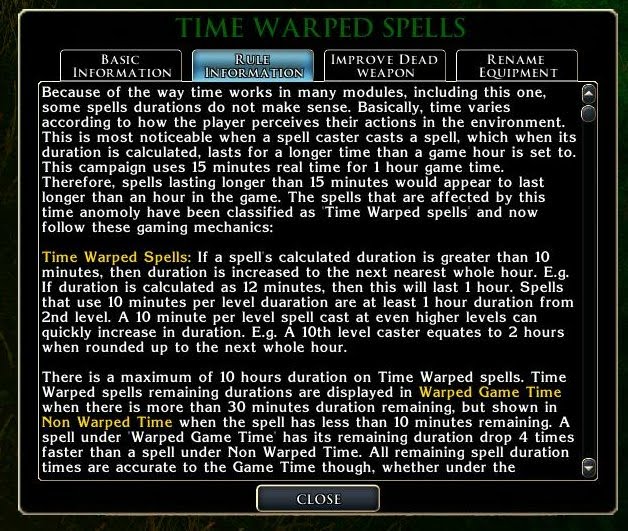
I will now discuss those spells that cause the problem with game time, how they are managed and how their duration time remaining works. The first time a PC receives one of these spells, the module updates the in game rules to explain the nature of these spells and their working within the game. (See screenshot below.)


As this screenshot explains most of the mechanics involved (and can be viewed and read by clicking on the image), I will only add a few more details to emphasise a couple of the points here:

Varying Duration: The most significant difference between this type of spell and all others is the fact that their duration alters when looking at the GUI remaining spell time. However, this is not exactly the case. What is actually happening is that the code is altering the figure to show the relative time remaining according to the game time. Let me explain the kind of thing that is happening with a Pen and Paper D&D example of a similar thing: A player tells the DM that their 12th level cleric is casting an Aid spell on themselves. This spell lasts 12 minutes according to the rules. The player then says I walk to the centre of town and attack the mayor. The DM determines that the walk will take the PC 10 minutes, leaving 2 minutes of the spell remaining. In a sentence that takes less than 10 seconds to explain that the PC is walking to town and attacking the mayor, the spell's duration drops to 2 minutes, even though only a few seconds have passed since the player said anything to the DM. Hopefully, this next screenshot will help demonstrate some of the in game feedback:


The 30 Min Rule: To begin with, take a look at the first screenshot again, and note the remaining durations for each spell. We are only interested in the Time Warped spells now, so ignore the spells in black (apart from Resistance, which I will touch on in a minute). You will notice that prior to taking the journey along the North West Road that Threska had the following remaining spell durations: Aid 56 min; Resist Energy 60 min and Blindsight 56 min. Now, however, after taking a journey lasting approximately 30 minutes, Aid and Blindsight have dropped to only 7 minutes remaining, while Resist Energy remains at a higher value of 32 min. This is because when Time Warped spells have more than 30 minutes remaining, time is deducted in 4 minute chunks (for every 1 minute real time) to reflect the module's time setting of 15 minutes real time equating to 1 hour game time. However, once they drop below 30 minutes remaining, the GUI updates to reflect Non Warped Time, and time is now only deducted by 1 minute for every minute.

Why 30 minutes? The answer is simply because this is the smallest amount by which time will ever be jumped forward in the game. Therefore, this same time span (30 min) acts as the governing factor in how Time Warped spells react with time. You will note that even though the remaining duration values currently differ after the travelling by 25 minutes, that in either of the following circumstances this system still works because:

a) If the player does not travel any further (and does not jump forward time), then within a few more seconds, the Resist Energy spell (which was cast just a few seconds behind the other two) will "catch up" with the Aid and Blindsight spells as it drops by 4 minutes to what would have been 28 minutes, which now translates to 28/4, which is 7 minutes, to display the same as the other two spells. All three spells now have approximately 7 minutes remaining. If they did travel again (taking 30 minutes), then all spells would be removed as they only had 7 actual minutes remaining.

b) If the player quickly turned around and did the same journey back (and jumping time forward by another 30 minutes), all the spells would still end simply because of the time for travelling. The Resist Energy spell might show as less than 1 min remaining upon arrival, but would quickly end after the same amount of time it was cast after the other two had been (within seconds).
Short Duration Spells: You will note that Resistance had disappeared from the list after the first travelling. This is because it only lasts a minute and so quickly dropped off as the PC travelled. All short duration spells will only ever show ACTIVE less than 1Hr, and is merely a courtesy comment to show them as active.

Long Duration Spells: By contrast, long duration spells will remain on the GUI for as long as the spell duration, and give a rough idea of how long they have already been running. Below are a few snapshots of the GUI showing the spells active and how long they have been running. Note, the Mage Armour spell was cast a few seconds after the other two, and so shows a slightly different time remaining in the middle image. Within a few seconds though (the time difference between the castings), the GUI updates to show the new time, which is similar to the other two spells.

The Differences: The bottom line is, the players will not notice the duration differences simply because the game adjusts according to the style of play. For even if a PC stays within the same area for a period of time greater than 15 minutes, an hour game time will pass thus ending any spells that may, at first, appear to be greatly improved by the system. When all the sums are done, it is possible that some spell combinations give slightly longer durations, but on the balance of things, I believe this gives a much more accurate system than the default.