Choose Your Language

Tuesday, 20 November 2012

A Day At A Time

Over the last two weeks (when feeling up to it), I have been trying to finish off another area. Hoegbo actually built the area in the toolset for me, but I have been writing the conversations and scripts to bring it to life. This area is a little more unusual in concept, and in my writing I am trying to ensure a balance between logical flow and what may initially come across as absurd. Of course, being a fantasy game, there is always a little room for maneuver and poetic licence, but I still think it needs to be handled carefully so I do not lose/frustrate the player. Hopefully, by the time the player reaches the end of the area, all will become clear and the experience will turn into an interesting one.

Conversation & Sound

During one part of the design, I did run into something interesting, which others may already know, but I will also comment on now for those who may not. If you have a sound object playing and the player enters a NWN2 style cutscene conversation, the player no longer hears the sound object playing. (The sound object is still playing, but it is suppressed during the conversation.) Interestingly, this does not happen with other styles of conversation windows.

A Haunting Flute Sound Comes From The Caravan

For instance, in the scene above the player hears a haunting flute sound coming from the caravan. When they go to investigate, this sound is suppressed (or not) according to the conversation GUI I use.

Smaller Interactable Hotspots

There is another handy tip I picked up when working on this part of the area: I did not want the entire wagon to highlight when approached and so used a smaller collision box to be the target of the conversation. However, a collision box does not have the small portrait picture of a wagon when in conversation. Therefore, I used some script on the collision box to initiate a conversation with the wagon instead (which now had the conversation). In this way, I was able to have a small "hotspot" that worked for a much larger placeable.

Conversations, plots and scripting continues ... all the while I feel up to it.

Saturday, 3 November 2012

Back On Track!

First of all, just to let people know that The Althéa Weather System is now on version 1.04. The latest version fixes a bug where the weather changer timer was not suspended when a PC went indoors. This meant an incorrect error message showed while indoors and the weather timer was messed up for a short period. Please report to me if you find any other errors that you believe require addressing.

In the last week I have been getting back on track with writing the quests. I believe I now have many of the final quests that will be in the module in place, and am heading towards the finish line in that department. On top of that, Ryan of Eguintir's Ecologies has been hard at work putting the finishing touches to the final level that needs building for the module. Once I have that area fully integrated, I will be 90% complete, leaving me only the need to finish the quests and upload for Beta testers. However, I don't want that to sound like a release any moment, because there is still quite a few conversations left for me to do, as well as final balancing.

Following Their Marching Orders

In the meanwhile, my goblins are also back on track when it comes to following their waypoints. What it is about the original official waypoint system that makes them fall away from the planned path, I do not know. However, my own system works well, and is now finished, and works with scripted waypoints too. Here are my goblins showing me that they can obey orders:

Goblins Following Their Marching Orders!

And Take On Intruders!
Plugin On Hold

I decided to put my looking at C# on hold. For while I believe creating a plugin may be useful for me being able to create content more efficiently in the future, I do not believe that I should spend time doing that just yet. It would only serve as a distraction to me, and so I will leave this for the time being, and maybe look at it again, or another utility that may be as useful, in the future.

Reality Check

The "level of reality to fun" poll finished a short while ago, and below are the results. I was interested to see the degree of those who shared my own desire to keep the feel of the campaign close to "real" as possible. In translation, I believe that to mean keeping logical flow relatively high, or at least as plausible as possible and to avoid "simple" quests, or those that feel orchestrated. That is a hard task to achieve without spoiling the fun factor, but is something I still hope to achieve.

Erring Towards Realism Is The Preference

Tuesday, 23 October 2012

Show Me The Way (Misbehaving Waypoints)

Before discussing this post's topic, I just wanted to let people know that The Althéa Weather System is now on version 1.03. The latest version fixes things such as cloud height and splash heights, and also has other effects added such as fog and dust storms. All these settings are easily adjustable for those with even basic scripting knowledge - and if used in conjunction with a module, can add some great atmosphere to an area.

The Wayward Patrol

I have started to work on creatures that players can encounter. This includes creatures that can be spawned via an encounter trigger and those already placed within an area at build time. As soon as I tested my first patrol of goblins, I encountered two problems:

1) The goblins did not drop what I expected them to drop according to their templates.
2) The goblins had their own ideas of where they wanted to patrol, even after I added waypoints!

Talk about creatures having a mind of their own! Unfortunately, this meant what little time I normally spend trying to build was spent sorting out more official campaign script. After some experimenting, I soon discovered that "spawned" creatures act differently to "placed" creatures when it came to identifying items in their loot drops. Eventually, I managed to update my own creature spawn and death scripts to ensure they only dropped what I wanted them to drop and identify (or not) the items accordingly. There is also a trick I learned from the forums that said to place items you want the creature to drop in their inventory (and mark as droppable) and to make sure all equipped items (like weapons and armour they use) are always marked non-drop. (If you want the creature to drop equipped items, you needed to give the creature a droppabel non-equipped version in their equipment as well.) Now, I just need to add a routine that differentiates between which items I may want the creature to be able to use in their inventory, like potions!

The second problem was more annoying, as I could nto see any reason why my goblins would not follow their waypoint path. And neither could I find out anybody else who had the same problems. So, it meant I had to write the script myself to make sure they stuck to their patrol path. This meant also having to change some of the minor functions that WalkWayPoints (the main function) uses, and so also change the way scripted waypoints worked for some of my other creatures. Thankfully, it is a simple enough task when done over a few days, but it is frustrating that it robs me of being able to do more plot writing. I hope to have the amended scripts finished soon.

Toolset Plugins

The funny thing about both of these issues I had, is that I was pointed to NWN2 Legends and the great work of Marshall as an alternative means to solve these issues. And if my own code had not already been written the way it has been, I think I would have delighted in using some of his systems designed as plugins to the toolset. However, as much as I would have liked to do so, I do not believe I can due to the fundamental differences between how our two games work. That said, however, I was so impressed by Marshall's plugins and what they could do, it did spur my own interest to look at plugins for the toolset again. Not just in implementing them, but maybe (if I ever get the time) actually designing some of my own to help me build the module more easily - and make tasks simpler. The problem is, my health limits me as to how much I can do, and if I do spend some time designing a plugin, I have to weigh up if the time spent making it will be rewarded in the time it helps save me in further module development. Thankfully, MS C# is a free downloadable program nowadays, and so the tools are there ... it now depends on its overall benefit.

The Opening Screen of MS C#
I have enjoyed programming for as long as I have had a computer and still have copies of The Pawn and Adlan (Adventure Language) for my old Amstrad. I even recall a database program I wrote in BASIC once (many years ago when I was fit and healthy in body and mind) that handled monster combat for my D&D pen and paper game. As C# seems very similar to NWN Script, I thought I might be able to try to combine a hobby of old with that of what I can still do now ... but, as I say, I am yet to convince myself that the time spent making a plugin will be worth it. Still, I like the idea, and if I ever have an extra burst of inspiration and enthusiasm, I may have a play and see where it takes me.

Monday, 8 October 2012

What's The Weather Like Outside?

As I was doing a test run on the module, I noticed it started to rain in the area. This was expected (as I had set it to rain), except that I felt it lacked the atmosphere I had hoped it would achieve. So I started to think about how I could improve on the basic rain settings and (thinking to save some time), I decided to check the Vault to see if anybody else had put together a weather system for NWN2.

After a quick search, I was pleased to find a few systems and briefly looked at each of them to see which would suit my needs. I found four systems that I may have been able to use, and thought the Abyssya Weather System seemed to be the best of the lot. However, once I looked at it more closely, I found a few bugs in the scripts and felt it was rather too cumbersome to implement easily. Don't get me wrong, I liked it and gave it a vote score of 7.00 (Very good. Deserves a look.) However, I hope the system I now offer to builders will be more useful from the point of view of being much easier to implement by being less cumbersome in code and more flexible in what it can do with just a little know how. You don't need to mess with the default settings, but if you have just a basic scripting knowledge, it offers a great deal of flexibility.

A stormy day at New Edgeton
The Althéa Weather System

After working out what I wanted the system to do, I managed to write the script as a single include file, called by one line from an area's ON CLIENT ENTER hook. From this call, the weather system is activated for the area in question, and the frequency of the weather checking can be modified from the default of every minute. A GLOBAL variable can be set at any time to change the weather to (currently) one of 12 weather conditions (if you include 0, which means SUNNY and no precipitation). Note, however, the system is flexible enough to allow a competent scriptor to add as many weather conditions as they want. Kamal even suggested a possibility of it raining frogs, which is possible with this system ... if you can design the "frog" VFX.

Furthermore, there are currently two area LOCAL variable settings available to allow the builder to set the weather for "desert" or "snow" regions, which limits the weather types to sun (no precipitation) and "downpour" (for the desert region) or "snow" instead of rain (for the snow region). Although, once again, a competent builder can alter their needs for an area and add it to the script easily enough. The system uses three types of snow: light, heavy and blizzard.

The system also manages seasonal changes. For instance, it is more likely to snow than rain in the winter months. The system also tries to keep weather directional flow as logical as possible. e.g. If it starts to rain lightly, it is more likely to continue to get worse before getting better, and vice-versa. The addition of "rain sounds" and "rain splashes", as well as the sound of distant thunder and nearby thunder claps (with lightning) all add to the immersive feel of the weather, adding atmosphere to any module that makes good use of it.

Note also that the script is very versatile and the VFX's used can all be altered if the builder prefers different settings. For example, the cloud effects (of which there is currently grey, dark grey and black) are all set to a height of 20 by default, which may be too low if you have many tall buildings in the area. It is easy enough to make these float higher, but bear in mind the higher you make them, the less the player will see on their display (unless looking upwards).

I will add this custom content to the pane on the left, under "My NWN2 Material", and for those who want a direct link to the Vault now, here is The Althéa Weather System. Below you can see a couple of video's as I was designing the system. The first shows how simple the weather can be changed, and the second shows the system with its clouds.

Recommendation: Switch to the HD video quality settings and allow buffer to fill before watching. Lower video settings you do not see the rain very well, or such things like the "splashes".


The Althéa Weather System - Showing Easy Switching


The Althéa Weather System - Showing Cloud Cover

Thursday, 27 September 2012

An Organised Inventory (Bag Types)

While not completely settled, things have calmed down at home for me a bit more of late, which has allowed me to do some more work on the module. This has been quite therapeutic. I started to look at the integration of the second module in the series. This is because I want to make sure there is a stable interaction between module transfers for those players wishing to play the series as a whole. There were one or two incidents I had to rectify already, but until I have finished everything in module one, I cannot be certain that I have sorted all requirements just yet.

Stabilising module connectivity aside, I have also been continuing to finish off those quests and related conversations that still needed doing. This has included adding treasure hordes (hooray!) and sorting monster encounters (boo!) to guard them. In the process of doing this, I decided to finish off the "automatic bag" system I had in mind to help keep PC's inventories organised as they acquired all these new treasures. Like most of my systems, this one is also an option for the player to use or not, but I hope they will see the benefits and take advantage of it.

Seven Simple Suggestions

There are seven types of "bags" that will be on offer to the player to acquire for their PCs, which they can use as they wish to or not. They are not forced upon the player, but are useful additions to help complement the "Tome" type holders that the player can acquire to hold "recipes" and "enchantments". These seven new bag types are as follows:


1 - The keyring keeps all keys in one place
2 - A Treasure Bag for all those gems and jewellery
3 - The Bounty Bag for creature part rewards
4 - Specialised Satchel for those with crafting skills (light items)
5 - Another specialised Satchel for those with Alchemy specific skills
6 - A more common magik bag for carrying the more cumbersome crafting components
 
7 - And finally ... The basic bag, which can be renamed to anything you like with the Smith Hammer


The first five bags all work in a similar manner, in that they all automatically have any item found by the PC placed into the appropriate bag if carried. The sixth bag (the Crafting Components Holder), also does this, but does so across the whole party. What I mean by this, is that any PC picking up ore, ingots, hides or planks will automatically place these items into this bag, no matter who in the party is carrying it (or the first bag found if more than one is being carried); whereas the previous five bags work only on the PC who carries them. The player is given notification of when an item is placed into a specific bag.
 
The contents of these bags can be removed at any time, but there are restrictions upon what can go inside these bags to help maintain a neat and tidy arrangement across the whole inventory. The process has been designed to help the player more easily recognise items that will be useful in relation to any crafting skills they are trying to develop. Using these bags, it will be a simple matter of checking inside the appropriate bag for the items required, safely in the knowledge that if it is not there, then you do not have it and it will not be anywhere else in your inventory (unless you have manually taken it out of course).
 
For those players who really like to keep everything in its place, then investing in a Smith Hammer to help rename/organise basic bags will be a pleasure. Feedback welcome!

Monday, 10 September 2012

Large Journal (Updated - Size Now Toggable)

This is just a very quick blog to let you know about my "large journal". After playing around with some other games of late, I noticed that the NWN journal was quite small and I felt would be improved by increasing its overall size for ease of use. Below is a screenshot ... any thoughts?

UPDATED: I have now added a toggle button along the journal's header bar to allow the player to toggle the journal size.

Too big for anyone?

Toggle between size to suit your tastes!
I considered that players will either be viewing their journal or not, so it's size could be increased without any competition for "real estate" in the game screen.

Tuesday, 28 August 2012

Screenshots (Cave Fight)

I have been able to put more into the module in the last couple of weeks, including some area design touch-up, some conversations, some scripts and some simple bug fixing. I have been varying the topic to help manage it more easily, as my concentration is up and down at the moment. I have also been tweaking the ambient sounds and behaviour a little to try to give a more in-depth feel to an area.

Anyway, rather than say much else at this time, I thought I would share some screenshots with you again on the latest area I am working on. A more in-depth blog another time. Feedback welcome.

UPDATE: For anybody who has been having problems with the CAPCHA system, I have turned it off for the time being. Hopefully, I will not get anymore spam, but also hope it will help regular posters from being able to post without the aggro I know that system can cause.

UPDATE: I have added a single torchlight comparison for those interested in the lighting detail. (The first screenshot is the new one with the single torch light.)


Wednesday, 15 August 2012

A Taxing Time

Just a quick note to say that I have had to deal with some real life issues that have taken the time I would have spent on the module in the last couple of weeks. (It was not the Olympics, I assure you!) Thankfully, there has still been some progress on the module, as Ryan of Eguintir's Ecologies has not only been working on another interior area for me, but also a few models for objects that I hope to use in the adventure. Once the area he is working on is completed, I will be able to finish writing the plot/script for it and the module will be another step closer to completion. In fact, if all goes well in the coming weeks (and I can manage the life events a little better), I may be able to update the completion score.

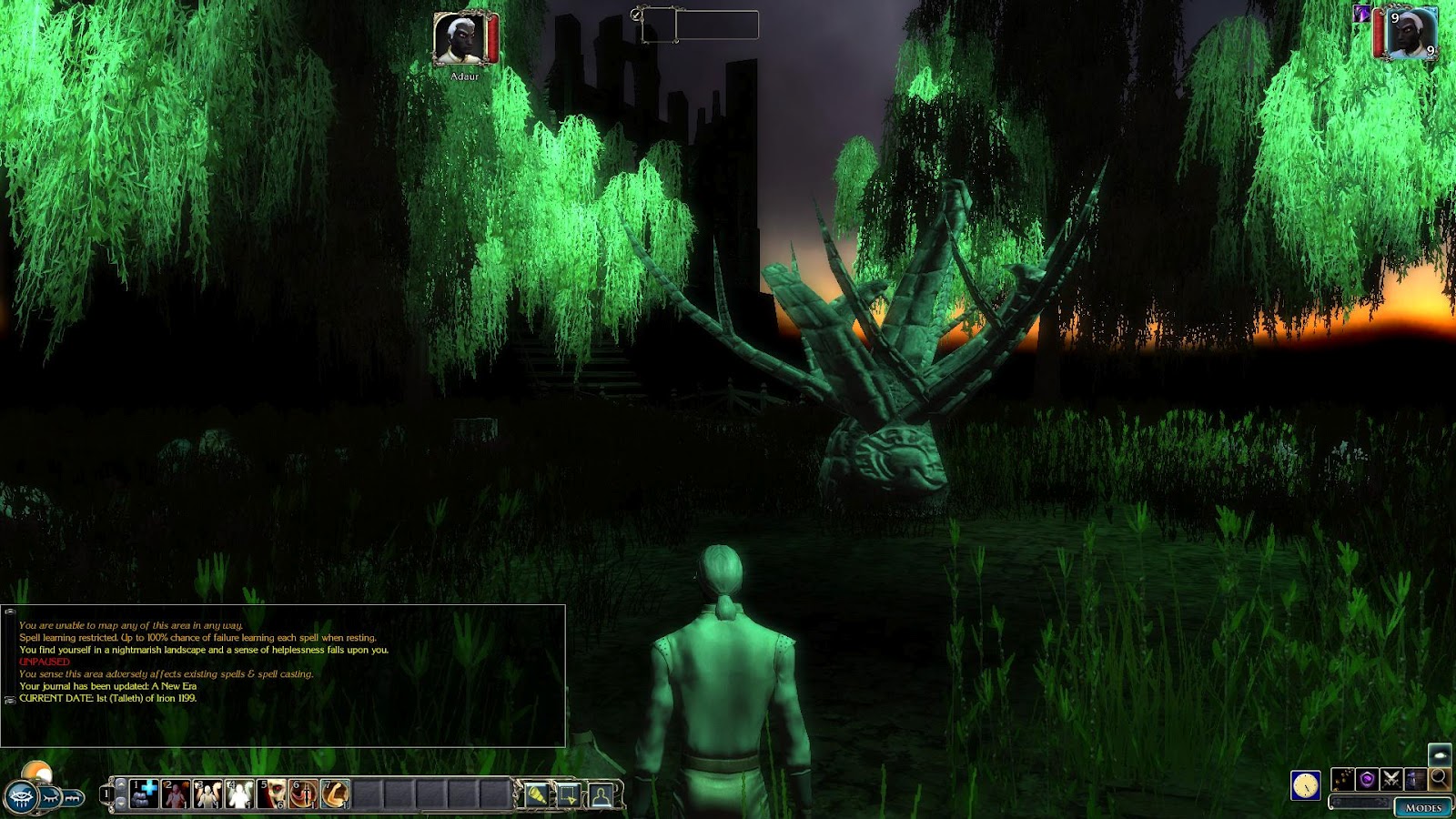
And so, out of character for me, I am showing a few screenshots from an area that I am currently working on (before the life events interrupted me), which I hope to get back to sooner than later. Roger (Hoegbo), of The Demon Melody designed this area for me, which I am trying to complete the plot and scripts to in the coming weeks.


The PC finds themselves in an alien landscape.


Friday, 27 July 2012

Design Changes? (POLL: Realism To Fun Ratio)

It's been a difficult couple of weeks since my last update due to various life turmoils. Suffice to say, the module has taken a back seat as I have had to deal with health issues and other upsets. I'm not downhearted, but simply report this to let you know why there has not been much to update you with today.

Future Design Changes

As I slowly approach the end of module one, I am giving some thought to what I will be keeping or losing in the final two modules of the campaign. Recognising how long this module has taken me (far too long), I have decided to re-examine some of the design concepts I started with for the campaign, and leave out those aspects that are simply not "worth" the time they take to include. Note well, I believe everything I have included is "worth" it from one viewpoint, but I have to recognise that it is not worth it, if it adds too much time to the overall development to the point where some players are no longer around to play it! Here are some of the changes that I will probably make:

1) Simplify Party Influence

One aspect that I am considering losing is the "influence" system I currently use. Please note, that I am not talking about doing away with choices that make differences in play, but about an underlying system that monitors the PCs friendships with NPCs, subject to how they treat them. The problem is (as it works at the moment), is that every step the PC makes can (if used) alter the way an NPC will respond to a player subject to a "score" the party has with the NPC in question. Keeping track of this is quite awkward, especially when it comes to tracking quest states where the NPC may be "required" to have some form of talking relationship with the party. Having to do write around this system slows down other aspects of module building, which I can do without.

2) Immortalise Quest Handlers

It grieves me to have to do this change, but having to work around whether a player will or will not kill an important NPC with respect to fulfilling a plot is another system that eats into time to do properly. At the moment, whenever I create an NPC that handles a quest, I am having to consider potential workarounds should the player decide to kill the NPC for some reason or another. I enjoyed this aspect when I first started it, but soon realised that it becomes almost impossible to work like this without ensuring at least some NPCs remain alive to deliver the story. If this means making them immortal (or plot) from the start, then I believe it must be a compromise to my own design desires to allow the game to work with more stability.

I believe the above two changes are essential if I hope to ever finish the final two modules of the campaign. Thankfully, I already have 90% of the areas for the next two modules designed, by help from other builders; and once this module is completed, I will have 90% of the scripts required for them as well. What I am trying to do now, is reduce the amount of conditional work that only serves to make further module writing spiral exponentially out of control.

POLL: Fun v Realism

I would be interested to hear from other players and builders about what aspects of a module they consider as "acceptable" with respect to what can and cannot be done in a module. With this in mind, I have put up a poll asking what players like (or accept) as fun for their style of gameplay. Here are two examples of my own, which I offer as a guide to readers when thinking about answering this poll:

1) I played Legend of Grimrock (nostalgia), and never questioned its logical flow. As just one example: the need to find a key for a locked door and yet not be able to pick it or bash it. It offered very little in the way of options for overcoming a locked door, but I still found it relatively fun looking for a key I needed. Even more unrealistic, the key could often be found sitting in a small alcove somewhere else. This design went quite against my own, but I still had "fun".

2) I like to drop into and play some of Two World 2 now and then, and noticed they also used a kind of "influence" system where a player might upset the locals if they bumped into them. At first I found that quite realistic and an interesting idea. However, as I have played more, I have found the system quite "pointless" in some ways, because (a) I only bump into them by "mistake" as I run by and (b)unless I do this a lot, it has little bearing. Even when I did have my influence taken to an extreme (I ended up having to fight someone), it just caused difficulty with the game as I had to wait for the system to allow me to speak to anybody else after that. (My own system is a bit better managed than that I hope.)

Let me know what aspects of a game you have played that have been fun or not ... or has even worn off as the game continues. Please vote in the poll and leave comments/examples of games you have played and your own experiences with them.

Thursday, 12 July 2012

Locate Or Create!

I have taken a break from writing conversations this week to concentrate on a loot script. The scripts that come with the official campaign are too generous for my tastes, and offer too many items that simply do not fit in with the style and design of the Althéa Campaign. As regular readers will know, this campaign is based upon my world, Althéa, and has nothing to do with the OC setting. This means I have to edit the scripts that give the loot, including any 2da tables that might be used. It is something I have been meaning to do for some time, as this particular loot script I am writing addresses potential weapon and armour drops, among other items.


The PC comes across some weapon racks! Maybe they will contain something useful?

Thankfully, I was still able to make use of many lines from the existing nw_o2_coninclude script that comes with the game, even if I ended up changing many of the items that can be dropped. Furthermore, I have redesigned the way the script works from the base up, as its probabilities are rather convoluted and are strongly tied into items that I do not want to include in the drops. The main thing I wanted was a script that could be made to randomise the chances, quantities and types of drops subject to parameters I set at build time. And while I have not yet completed (made use of) class related code, it is place to make use of if I ever want to come back and do so.

Crafting Reference Lines

Fellow builders may be interested to know that I discovered one needs to add a line to the crafting_index.2da if one is adding recipes to the crafting.2da. You need to add a line to the former 2da file to inform the latter which line the associated crafting item reference starts from. If you do not do this, then the ginc_crafting script will not work properly and always return a failed recipe. This module, The Scroll, makes use of all the crafting systems that have ever come with the NWN2 games, but this is referring to the earlier original system. Hopefully, the compiled image below will help explain.


Make sure you add the starting line for any new craft recipes required in the crafting_index.2da

Build It Or Loot It?

Now, you may be asking why was I editing crafting systems while writing a loot script? The answer is because I have added/edited in items to the loot script that reflects what players can also craft. This includes the various forms of splint mail (darksteel, mithral and adamantine), which I have found missing in the original campaign, but have added back for my own modules. In fact, the whole crafting system has undergone quite an overhaul over the years, which I hope will give the game a fresh feel for players when the time comes.

Tuesday, 26 June 2012

Runes Revisited

Some time ago I made a blog post about some puzzles I am going to include in the module. One of them involved runes: a fantasy element that lends itself to puzzles and magic. This time around, I have expanded on the idea that the PCs are required to seek and collect various runes that they will need to help with the "puzzle" itself. At this stage, the puzzle acts as a "lock" to whatever the PC is trying to gain access to. However, I have also added the idea that these same runes play another active role in rune magik, which the PCs can learn about in one of the adventures they have. I won't go into detail of the latter, but here are some screen shots that give an idea of the former rune puzzle, which has a gaming element similar to the classic "Mastermind" puzzle.


The PC encounter the "Rune Lock" puzzle and the game automatically presents all the runes that the party have acquired in their adventures to date. (Gaps are missing runes.) In this case, the heroes have found half of the 24 runes that are available.


The player starts to enter possible combination of runes and observes the rune reactions. It looks like none of the first four runes tested are required for this lock! One attempt down!


The player tests another set of runes from those they have available to them. Ah! A bright glowing rune that indicates it is correctly positioned. But now only eight attempts remain and the party only has 4 remaining runes to test. Do they have the runes they require? Unlikely!

In this case, the chances are that the party have not yet even found all the runes they need to unlock this object. So, they must continue their search for runes to help them past this lock. If they fail to find the combination in the attempts remaining, then they can either expend a Life Essence to give themselves another attempt (one Life Essence per additional attempt) or wait a period of time for the lock to reset. Most Rune Locks start with ten attempts, but it may be possible to find Rune Locks with less attempts available from the start.

Module Progression

Along with designing more puzzles/mini-games, I have been continuing to work on conversations that join the areas and story together. As I have reported before, it is a slow process, but it is coming along.

I would also like to take this opportunity to thank Eguintir of Eguintir Ecologies for helping me with the design of a couple of areas. As regular readers will know, I find designing and working with areas one of the hardest aspects of the game, and Ryan very kindly offered some of his time to take care of a couple of interior areas that were outstanding for this module. He has already returned one area, which is near completion, and I believe is hard at work on the second. His contribution is very much welcomed, and I hope players will appreciate his work in this module as much as they may have in his own modules.

Saturday, 9 June 2012

Map Pins For The Player

I have found that another enjoyable aspect when playing an RPG involving maps is not only having Fog of War, but also having the ability to add notes to a map in the way of map pins. NWN1 had this capability, but, for some unknown reason, it was not included in NWN2. Over the years I have been writing this blog, readers will know that I have been looking at a system that allows a player to add personalised map pins to the area map. In the last week or two, I have polished this some more to work in the following manner:-

1) Map Pin controls have been moved to the Area Map GUI itself (rather than be on the Main Menu).
2) The Area Map has had a face lift to complement this, by having the map name moved to a better position.

Map Pin Focus

The Map Pin system is controlled by a player's Main PC only, which means all map pin buttons are only available to the player's Main PC (the one they log into the game with), and pin locations are set according to this PC's location in the game. This avoids confusion of pin placement if the player had been controlling a different PC other than their Main PC at the time of adding a map pin. The Map Pin button are:-

1) Add Map Pin: This allows the player to place the Map Pin and add some text to it.
2) Edit Map Pin: This allows the player to either edit the Map Pin text or remove the pin completely.
3) Update Map Pins: This immediately adds floaty text to the Map Pins on the Area Map. (SP game only.)


Map Pin Text

With my system, when a player creates a map pin using the Add Map Pin button, they are presented with a text input GUI where they can add some descriptive text. When they select the Create Pin option, a small visible pin is placed in the game area with the text the player added, and a small blue pin marker is added to the Area Map at the same time. However, the blue map marker does NOT have the usual floaty text added at this time. All the while the blue map marker does not have floaty text (which is added if the player leaves the area), then if the player chooses to delete the Map Pin, then the associated blue map marker is deleted at the same time.


Area Map Floaty Text

When a Map Pin is first placed, the associated Area Map blue marker does NOT have floaty text like pre-placed map pins usually have. In the case of player created Map Pins, floaty text is only added to the Area Map blue marker after the PC leaves and re-enters the current area where the player has added Map Pins. Furthermore, if a Map Pin is deleted by the player after it has had its floaty text added (by the player leaving and returning to the area with the Map Pin), then the Area Map will not update (have the blue marker deleted) until after the PC leaves the area and returns to it again.

Forcing A Map Pin Update (SP Only)

In a single-player (SP) game, a third button labelled Update Map Pins is available (if not in combat), which forces the PC to immediately exit the current area and return to it again (at the same location). This then updates all the player's Map Pins since their last update by either:-

1) Adding floaty text to Area Map blue makers of newly added Map Pins or ...
2) Removing blue markers (with floaty text) from the Area Map of recently deleted Map Pins.

NOTE: This option is disabled for a multi-player (MP) game to ensure added game stability and to avoid confusion for other players.


Monday, 4 June 2012

Placeable Hit Points Matter!

Thankfully, all matters pertaining to the database issues have now been sorted, and I have been able to return to adding to the module content in general. This has included more conversations, decorating some areas and basically adding content in different areas as I decide to do it. And it was as I was adding one piece of content involving a placeable object, I made a discovery regarding hitpoints of objects: If a placeable is not given any hitpoints, then it can have a different reaction with script.

Should I Stay or Should I Go?


I designed a placeable object that presents the player a GUI when they click on it. However, I discovered (after comparing another placeable object to this one), that where the new object had zero hitpoints (HPs) assigned to it, a PC would not move up to the object (as if interacting with it) before presenting the GUI. On the other hand, if the same placeable was assigned a few HPs, then the PC would run up to the object as if interacting with it just fine.

What Shall I do?

Furthermore, I discovered that a placeable with or without HPs will also elicit a different response from the script attached to it. This is a little hard to explain, but it's as if a placeable without any HPs is treated as a "non-responsive" object compared to one that does have HPs. Now, this may be obvious to some builders (and already known by them), but I had no idea that this distinction of HPs for placeables had, and is why I am now mentioning it in case others did not know either. For instance, in the same test, the placeable with no HPs would not fire another script attached to it when certain variables are met, compared to the placeable that did have HPs associated with it!

The Script Function

The function involved in the initial script I was using is GetPlaceableLastClickedBy. Whether the responses I was having are restricted to this single function or not, I do not know. However, if you do use it, or have found PCs not responding to placeables in the way you might expect, then check the placeable's HPs, as it makes a difference as to whether they have any or not!

New Area Design

On another point, I am pleased to report that Ryan of Eguintir's Ecologies is hard at work finishing off/designing a couple of interior areas for me. Ryan has already designed some areas for The Scroll (Pt 2), but these latest additions will be used in The Scroll (Pt 1). When these two interior areas have been finished, only one or two minor interiors remain, requiring minimal work.

I thank my readers again for their patience with me on this project, and I hope their patience will be rewarded with an exciting module to play. The amount of time to develop a module does not guarantee such of course, but I do hope the wait will be worth it one way or another.

Friday, 18 May 2012

Database Debacle: Transition Crashes!

It came somewhat as a surprise when as I was testing my module it came crashing to the desktop. I had just created an entrance to a small cave area I required and was testing the transition between it and the outside area when this happened:


What had gone wrong? I had not changed any of my scripting and was unaware of any corruption in my files, and so I was somewhat dismayed when I could reliably repeat the crash every time I tested the new transition. I then tested an older transition and all seemed fine, until that was, I tested it a number of times, and then, sure enough, it would crash to the desktop. More investigation was required ...

Deadly Database

I have often heard of the problems people claimed that the inbuilt database functions caused the game, but had never encountered anything specifically wrong with using them before. However, after some investigation, it turned out that the transition crashes were occurring after a database call had been made by one of these functions. Yet, as it turned out, it was not specifically this, but only if the database reference was new. That is, if the database reference already existed in the database, then any call to it did not lead the game to crash. However, if a database line was added to the database during the game, then the game was likely to crash at the next area transition, especially if either of the areas were large. (Larger areas appear to expedite the chance of a crash after the new database call occurs.) Even if you were blessed to get away with one transition, the game would crash at a transition soon after.

The Solution

As The Scroll makes good use of these database functions I needed to find a resolution, or all my efforts to date with them would have been for nothing! Astute readers will have probably already guessed at the solution I finally came up with: Make sure the database is established (initialised) before the player plays the game. So when a player starts The Scroll for the first time, they will now be presented with the following GUI screen:


Hopefully, players will recognise this as a minor inconvenience to help provide a crash free game session thereafter. (That is the plan at least.) Depending upon how one has used the campaign database functions will also determine how you go about setting up your function to set up the database. For myself, there were one or two simple single lines to add a single row reference, and in other instances I was able to use a loop to set aside all the rows (for objects) that I needed. For added security, I added the variable holder reference to the object in question as a local string to refer to when the database variable holder was required. This was just to make sure there was no change in variable holder name between me setting the database up and the time I needed to refer to it.

Conclusion

It may be that you have had some strange transition crashes in the past and wondered what caused them. Hopefully, having read this you will be armed with another potential method to overcome them. I also discovered that Runtime Errors (especially on exiting the toolset) are caused by misuse of Include files. i.e. Different scripts may be calling the same Include that is already included in another Include associated with them (if you see what I mean).

So, if you have any information on what causes a game (or toolset) to crash, which may not be obvious at first glance, then please respond in a comment. Shared info like this is definitely a "prevention is better than a cure".

Thursday, 3 May 2012

Althéa: Party Creation Rules (Manual Entry)

I have been continuing with conversations and the quest journal entries associated with them. It is the crux of the story and so is not something I can go into much detail about, apart to say that it is coming along slowly but surely. So, to give you something to read this week, I decided to show you another page from the manual that I hope to ship with the module. This week, a little more information about Party Creation and how multi-player games affect it. As I said last time, if you have any questions about the module or just wish to leave a comment, please do.

Party Creation

Before the player is finally released to explore the World of Althéa, they are offered the chance to add some more PCs to their Main PC to make a party of up to four characters. The following information screen pops up prior to the main creation screen. As it says, party creation is not required, as their are companions that can found and added instead. However, the player can choose to add some PCs now and add others as companions later when they come across them if they so wish. Once the player presses "OK" to this screen, they will be presented with the standard SoZ style party creation screen, where they can continue to create their party of up to four, or choose "cancel" to play alone.


MP Considerations: When it comes to Party Creation, the players that are playing the game count as "non-player" created PCs already. Furthermore, if the host player uses all three empty PC slots to create a party of four, then later players entering the game will not be able to add any more created PCs at all. E.g. If two players play the module as a MP game, then each player could add another PC at the party creation screen to their specifications, to make a total party size of four. i.e. Two real players, and two created PCs. Alternatively, if a group of players entered one at a time, then the fourth player to enter would fill the last fourth slot and be unable to create any party PCs. Practical usage will demonstrate how this works.

Monday, 23 April 2012

Althéa: A Unique World (Manual Entries)

This week's post covers a couple more pages from the manual that I hope will be completed and accompany the module by the time of its release. For as much of what I am doing at the moment is simply writing conversation lines for the NPCs, there is not much more to say that may otherwise give away spoilers. However, if there is anything more you would like me to discuss about the module, then please ask me in a comment. In the meantime, here is some general information from the manual, which I welcome comments or questions on as ever:

A Unique World

Althéa is a unique world, designed by myself and set within its own cosmology. It has nothing to do with Faerun, or any of the official campaigns that are available to buy (or download) and play. Therefore, there are some restrictions and differences that are immediately enforced, even before the player builds or imports their PC to play. For a start, the following seven classes are not found within the World of Althéa and are not allowed entry:


Furthermore, the following "named" spells have had their names removed throughout the game, and will be referred to without their "name":


The Gods of Althéa

New Gods:
With a new world, comes new gods. Some gods (especially for the non-human races) may remain unchanged. (They were kept as such within the Althéa Campaign.) However, all the human gods will be different - and subject to which god your PC has when they enter the world, they may find the god changed to one appropriate to Althéa, or have their deity name labeled as "Uncertain/Searching". If you are creating the PC from new, then you will be given a choice of valid gods from which to to choose. (See an example of some in the image below.) If the PC is imported, however, then a check is made to ensure no invalid faith enters the world. If you are playing a cleric, the game ensures you enter with a valid faith (rather than "Uncertain/Searching") and provides you with an appropriate holy book, which is required to learn spells when resting.

MP Alignment Restrictions: If a MP game is already underway, then it is possible that the current party of players has already committed themselves to either a good or evil alignment. If this is the case, then the newly entering PC will have their alignment changed to that of the party, which may mean clerics being out of favour with their god and unable to pray for spells. Therefore, make sure your PC’s alignment matches that of the party leader in a MP game to be sure of having access to spells.

Saturday, 7 April 2012

Better The ... Economy (A Manual Entry)

The World of Althéa has a long history and has undergone a number of cataclysmic changes during its time. Part of this adventure will be to learn how the world has changed yet again, and how this change has had an impact on its people and your own characters. As such, your PC’s learning curve will reflect your own when it comes to certain aspects of the game. However, there is some world knowledge that can be shared now as it differs from standard NWN games you will have played before. This is not exactly game "mechanics", which is explained in the next section of the manual, but a continuation of describing the "flavour" of Althéa.

Althéa Economy

As Althéa is considered a "low magik" world, there is little need for the huge amounts of gold that are often used in other game worlds. A high gold economy problem arises because each "better" magik item that enters the market forces a higher price to be needed for its acquisition, which quickly becomes ridiculously high, skewing many other price factors and forcing builders to "fudge" other costs. While fudging costs this way may fix some results, it often leaves many other items greatly out of proportion. E.g. Often, the costs of components to create an item are considerably higher than it would be to buy the product already made. Such an economy only serves to devalue any crafting skills a PC may have.

To this end, many of the game’s 2da files relating to the costs of items have been recalculated and reworked to reflect an economy geared around the cost to cast spells at a given level, and then all other cost factors were arranged around these figures. (See the table below for the calculated costs of each spell.)


As a result, many of the more expensive items plummeted in cost, to around a tenth of their original value. This, however, fitted more closely with Althéa’s economy where 1 gold piece (gp) was an average day’s wage; meaning it would not be unreasonable for an average NPC to be able to afford the cheapest potions after saving for a short time.

Further consequences of this lower priced economy means the cost to craft or enchant items has greatly reduced, but continues to reflect a more realistic scale of costs where the items can be found in the first place. More importantly, PCs who can craft will now economically gain from doing so.

Thursday, 29 March 2012

What's In A Name?

I have been giving the name of the modules for the campaign some thought in the last two weeks and, to date, I am preferring "The Scroll!". But, why am I mentioning this now? Well, the "Better The Demon" name has always been (and will remain) the module's working title. However, as I am beginning to bring the story arc together and think about the different backgrounds from which the player can start, I wanted to have a story name that fulfilled the overall reason for the module's existence. As time has gone by and I have given this campaign more thought, I have swayed one way and another, and even now I am not 100% certain. But, what this also means is that the module is coming closer to completion because of the naming. It's strange how someone can work on a project for a number of years, know the story, and yet not know why it exists! OK, let me stop there before I get too philosophical. The bottom line is, I believe my reaching the end of this module is becoming more of a reality every day. That's why I felt it important to let you know that the module has finally yielded its name to me ... or is very close at any rate. For if I do not receive any more inspiration regarding the title, it will remain "The Scroll!" (Part 1 for the first module).

Poll Results: Lighting

The results of the last poll for lighting preferences are shown in the image below. There was a clear 3 to 1 preference for the lighting to remain true to the environment rather than fiddle with the lighting to allow the player to see regardless. The two "other" comments touched on something which I also agree with though, which is to sometimes adjust lighting from what would be a completely dark environment (in reality) to one filled with some unusual light settings for a fantasy environment.

So, the bottom line here is that a player will have to ensure their PCs have some means of lighting some environments where it is otherwise completely dark. Of course, PCs with Darkvision will be OK, but other PCs may require torches, lanterns, light spells, or magik items with light to be able to make any progress in a dark area.


General Progress

This post is more straightforward than usual because I have not been doing much more than filling in blanks and empty templates of sections that needed doing. That has included writing some conversations, doing a little scripting, and thinking about the module in general. I have also sent some area information to Eguintir Eligard, who has generously offered to help design it for me, and save me from a task I am not very good at at the best of times.

I will keep plugging away at this all the while my health permits, and will, of course, keep you updated here in future posts.

Monday, 12 March 2012

Development Still At 85%?

Regular readers will have noticed that the module has not progressed beyond 85% for quite some time now, and I feel I owe an explanation for this. I may have already explained it once, but would like to explain the apparent "inactivity" it would suggest.

First and foremost, I do have to explain that my illness does prevent me from working on this project as quickly as I would like. Although, I don't want this to come across as an "excuse" for being so slow, but it obviously does affect the rate quite dramatically. That said, because my illness impacts everything I do, I rarely find myself in a position where I can do much else anyway, and so I end up doing what I can on the module just to keep myself from going insane.

Anything on the notice board regarding when this module will be completed?

Now, one of the main reasons this figure has not moved much in the past few months, is because I recognised that after breaking the campaign into three parts, and determining to release the first part as soon as it was finished, that the first part (by itself) would be rather lacking in design/depth - and so would need extra material. That is, much of my earlier work (as I worked on all three parts at the same time), had to be sidelined to a later date and until after I have released the first part.

It was at this time, that I decided to add a new exterior area (whose screen shots I added a few months ago) and to work on the adventures around this new section of part one. And rather than recalculate the amount of work I had already done towards part one (and which would have appeared to result in a backward negative movement in its development), I decided to leave its percentage score alone until I had caught up with its calculation.

Since that time, I have been working on both the new area and its associated interior areas and the adventures that go with it. At the same time, I have been tying in the existing material that I have been working with previously for part one. I am excited by the results, as the module does now feel much more rounded and will make for a great first part. Yet, the addition has meant the module's overall development score has been left untouched as I work out just how much the overall position for part one is.

In a very rough calculation, I would say that part one is probably around 65% complete, but this would not necessarily be an accurate figure representing time remaining because the parts that remain to do are much simpler than previous parts. However, I am reluctant to suggest how long these remaining parts will take me, as they are the "fluid" sections of the design that will increase or decrease in length according to how the story develops in my own mind. i.e. If the related story/quests are straight forward (which is my aim), then a figure of around 85% is about right. However, I have found that some of the latest developments have taken longer than I first thought they would, and so I have not yet been able to increase this development figure either.

What I can say is:-

1) One interior area still needs its design finished.
2) A handful of interior areas still need some contents/placeables adding.
3) Four quests need finishing (as far as journal entries appear to go).
4) A few creature stats and placements remain for a few areas.
5) Only 2-3 main conversations remain to be written.
6) Some spell scripts need editing to be compatible with a couple of my systems.

I am currently working on parts 3, 4, and 5, as I find these parts the easiest to manage . Parts one and two I will only be able to tackle when I am feeling at my best, which I am unable to predict. Part 6 is something I can work on at a later time as and when required.

I do thank you all for being patient with me, and the encouragement I still receive from you helping me to persevere with it. And I certainly do appreciate the help and offers I receive about helping me out with the latter parts (modules 2 and 3), which I would welcome if people are still up for it.